
Download LandscapingAI – AI‑powered landscape design tool, visualizer and planner
Overview
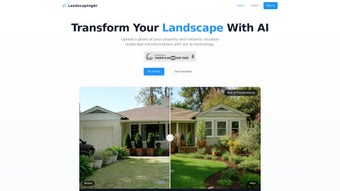
LandscapingAI is a cloud‑based, browser‑first application that brings sophisticated artificial‑intelligence capabilities to the world of outdoor design. By uploading a single high‑resolution photograph of a yard, patio, or commercial property, the platform instantly analyses existing hardscape elements, plant material, topography, and sun exposure. The AI engine then generates multiple design concepts that range from modest lawn upgrades to complete garden overhauls.
Each concept is rendered as a photorealistic image, allowing users to see exactly how new pathways, lighting fixtures, water features, or plantings will appear under different seasonal conditions before any ground is broken. The workflow is deliberately “preview‑first,” which eliminates costly guesswork, shortens project timelines, and builds confidence for both DIY homeowners and seasoned landscape architects. Because the software runs entirely in the browser, there is no need for bulky installations, and updates are applied automatically on the server side.
The interface is built for simplicity—no CAD knowledge is required—yet it includes advanced options such as precise plant spacing calculations, soil‑type recommendations, and cost estimations for material and labor. Whether you are a homeowner planning a small patio renovation, a contractor preparing client proposals, or a municipal planner visualizing a public park, LandscapingAI offers a secure, scalable, and continuously improving solution for turning outdoor visions into reality.
Key Features, Pros & Cons
- AI‑driven site analysis: Detects trees, structures, slopes, and existing hardscape from a single photo.
- Multiple design concepts: Generates 3‑5 tailored layouts based on style, budget, and maintenance preferences.
- Photorealistic visualizations: High‑resolution renders with accurate lighting, shadows, and seasonal foliage.
- Extensive plant database: Over 10,000 species with hardiness zones, water needs, and growth rates.
- Cost estimator: Provides approximate material and labor costs for each concept.
- Collaboration tools: Share secure links or export PDFs for clients, contractors, or family members.
- Continuous learning: The AI refines its suggestions as users give feedback.
- Cross‑platform accessibility: Works on Windows, macOS, Linux, Android, and iOS browsers without downloads.
Pros
- Instant AI analysis removes the need for manual site surveys.
- Photorealistic renders build confidence before any physical work begins.
- Generous free tier makes the tool accessible to hobbyists.
- Comprehensive plant database reduces the risk of unsuitable species selection.
- Browser‑based architecture ensures automatic updates and low system requirements.
Cons
- High‑resolution exports are locked behind a premium subscription.
- Complex commercial projects may need additional manual fine‑tuning.
- Constant internet connectivity is required; offline use is not supported.
- Initial image processing can be slower on low‑bandwidth connections.
- Specialized irrigation or lighting systems are not fully modeled yet.
Installation & Usage Instructions
Step‑by‑Step Setup
1. Visit the official website: Open landscapingai.com in any modern browser (Chrome, Firefox, Edge, Safari).
2. Create an account: Click “Sign Up,” provide an email address, set a strong password, and confirm via the verification link.
3.
Select a plan: The free tier allows three renders per month; premium plans start at $9.99 / month for unlimited renders and HD exports.
4. Upload a property photo: Drag‑and‑drop a clear, well‑lit image (JPG, PNG, or HEIC, max 15 MB).
5. Define design goals: Fill out a brief questionnaire covering preferred style (modern, cottage, xeriscape), budget range, maintenance level, and any elements you wish to keep or discard.
6.
AI analysis & rendering: The engine processes the image (usually under 30 seconds) and presents multiple concepts. Toggle “Day” and “Evening” lighting to preview different moods.
7. Iterate and refine: Use the side‑panel tools to swap plant species, adjust pathway widths, or add decorative features.
Real‑time previews update instantly.
8. Export or share: Download high‑resolution PNGs or PDFs, or generate a secure shareable link. Premium users can also export a 3‑D walkthrough video.
Tips for Best Results
• Capture photos on a clear day from eye‑level to improve AI detection accuracy.
• Include recognizable reference points such as fences, driveways, or existing structures.
• Provide any known soil‑type or sun‑exposure notes to help the plant database suggest suitable species.
• Explore the “Style Inspiration” gallery for trend ideas that can be added to your brief.
• For large teams, consider the “Team” plan which enables multiple users to collaborate on a single project file.
Compatibility, System Requirements & FAQ
LandscapingAI is a pure‑web solution, meaning it runs on any device with a modern browser that supports HTML5, CSS3, and WebGL. Tested browsers include Chrome 95+, Firefox 92+, Edge 94+, and Safari 14+. Mobile devices running Android 8+ or iOS 13+ enjoy full functionality, though the most detailed editing experience is achieved on a desktop or tablet with a larger screen. Because no software is installed locally, system requirements are minimal: a stable internet connection and a browser capable of rendering high‑resolution images.
Frequently Asked Questions
Is LandscapingAI really free to use?
Yes. The free tier provides up to three design renders each month, which is sufficient for most hobby projects. Unlimited renders, high‑resolution exports, and priority support are available in paid plans starting at $9.99 per month.
Can I access LandscapingAI on my smartphone?
Absolutely. The web app is fully responsive and works on both Android and iOS browsers. While core design tools are available, detailed editing is easier on a larger screen.
How accurate are the plant recommendations?
The AI cross‑references your location’s USDA hardiness zone, sun exposure data you provide, and the plant database’s water‑needs profiles. Recommendations are highly reliable, but we still advise a final check with a local nursery for micro‑climate nuances.
Do my photos remain private?
Yes. All uploaded images are stored on encrypted servers and are only accessible through your private account. You control whether to share a design link or keep it completely private.
What support options are available?
Free users can access a community forum and knowledge base. Premium subscribers enjoy 24/7 live chat, priority email support, and exclusive webinars on advanced landscape‑design techniques.
Conclusion & Call to Action
LandscapingAI bridges the gap between imagination and reality for anyone looking to revamp an outdoor space. Its AI‑driven analysis, photorealistic visualizations, and browser‑first accessibility make it a standout tool in a crowded market of landscape‑design software. Whether you are a DIY homeowner, a professional architect, or a property manager, the platform delivers speed, accuracy, and a user‑friendly experience that scales with project complexity.
The free tier lowers the entry barrier, while premium plans unlock high‑resolution exports and priority support for larger or commercial jobs. Ready to see your garden transformed before the first shovel hits the soil? Sign up for a free account today and start visualizing your dream landscape with the power of AI.
Overall Rating: 4.5 / 5
Pros: Accurate AI analysis, photorealistic renders, generous free tier, cross‑platform access.
Cons: Premium required for HD exports, always‑online requirement.



.png)



